How to Buy Here
Order, pay, receive
- $8.36
- per 100K on PC
- 2 hours
- Comfort Trade delivery
- 21 days
- refund window
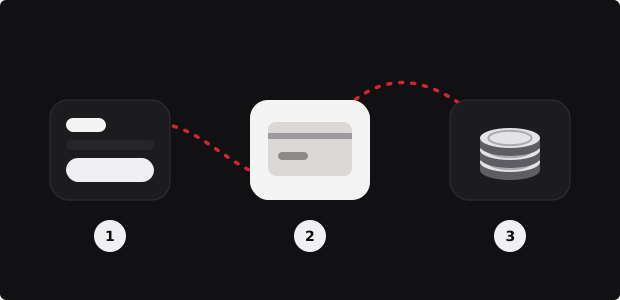
From this page to your club in three stops
The desk prepares the order, the payment page takes the money and the delivery details, and a seller moves the coins into your club through Comfort Trade.
Check these before the payment button
- The desk’s platform matches the console or launcher where your club opens: PS5 or PS4 means PlayStation, Series X|S or One means Xbox, and the EA app, Steam or Epic means PC.
- You know which address the club’s EA account is registered under.
- Two-factor authentication is on and you can open View backup codes in the EA account’s Security and Privacy section.
- You can stay out of Ultimate Team for a while after paying: console, PC, Web App and Companion App.
- The amount is at least 100,000 coins; smaller orders are not accepted.
Ready? Go back to the order desk, choose the platform and the pack, and check the total before you leave the page.
Paying: methods, currency and the account
The payment button carries your platform and amount over to the payment page. Shoppers in the United States see the total there in dollars, the same amount quoted on this board, plus the fee of the method they pick.
Methods offered: Visa / Mastercard, Apple Pay, Google Pay, Link, Klarna, USDT / USDC. Card details are entered on a Stripe payment page, crypto on the checkout’s own page, which confirms the transfer by itself. Fees differ by method and sit beside each method’s name, so compare two before you confirm.
PayPal is handled by hand: before any payment, ping support through the chat window or Discord, and a PayPal request will follow.
After payment: the delivery form and the statuses
The order appears in My Orders. Open it and complete the delivery details with two entries: the address of the EA account behind the club, and a few codes copied from View backup codes. One code covers one sign-in by the seller, who adds the coins and leaves.
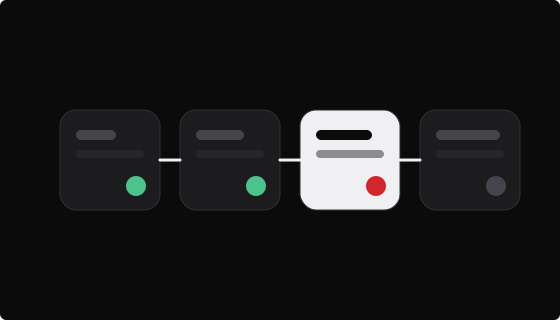
The order then moves through these statuses:
- New Order: payment received, the order waits for delivery.
- In progress: a seller is working on it, shown with a number rather than a name.
- Completed – awaiting your confirmation: the seller marked it as delivered. Check the balance.
- Completed: the checkout’s team closed the order.
A canceled order shows Canceled. Orders whose payment never went through do not appear in the list at all.
Waiting well, and what to do if it takes longer
Stay logged out of Ultimate Team everywhere until the order reaches Completed – awaiting your confirmation. Opening the club on a console or in the app while a seller is signed in can break the session and push delivery back.
The payment page promises within 2 hours. If that passes, or you have heard nothing after paying, check that the payment confirmation email arrived (and the spam folder), then write to live chat or Discord with the order number.
Canceling
Canceling has no button of its own; support does it. The refund window runs 21 days from payment. Undeliverable orders come back whole, half-delivered ones are settled in proportion to what is still missing, and second thoughts cost a tenth of the order. For the price side of an order see the FUT market prices board.
Questions people ask mid-order
Today the lowest rate is $8.36 per 100K on PC.
Do I need an account on the payment page?
Coin orders need one. A new address gets an account set up automatically, with the sign-in details sent by mail. An address that is already registered should sign in before paying; the order then appears in My Orders, where the delivery details are entered afterwards.
Where exactly do I enter the backup codes?
On your order, after payment: open My Orders on the payment page, pick the order and fill in the delivery details: your EA sign-in address plus the codes. Each code opens one sign-in. If the seller runs out, support will ask for fresh codes in the order chat.
Can I fix a typo after sending the details?
Not on the form itself; sent details are locked. Open live chat on the payment page, quote the order number and give the corrected details. Support updates the order and the seller continues. Quick contact helps, because delivery may already be under way when the mistake is noticed.
The order says Completed – awaiting your confirmation. Now what?
It means the seller reports the coins as placed. No button waits for you: open Ultimate Team, look at the balance, and if it falls short, write so under the order. Once all is well, the checkout’s team switches the order to Completed and archives it.
Everything is ready on the desk
Your choice is still there at the top of the page. Check the total and continue to payment.
Back to the order desk ↑